MPSM-S1 Microprocessor Power Control...

MPSM-S1 Microprocessor Power Control Panel

Mikroprocesorowy panel sterowania mocą MPSM-S1

.

MPSM-S1 MICROPROCESSOR POWER CONTROL PANEL

MPSM-S1 Microprocessor Power Control Panel

The most important factors that determine the correct operation of modern automation, electronics, industrial computers and other devices are the correct power supply and the appropriate climatic conditions. These are necessary to ensure ongoing operation of priority infrastructure equipment – server room, data communication, power engineering.

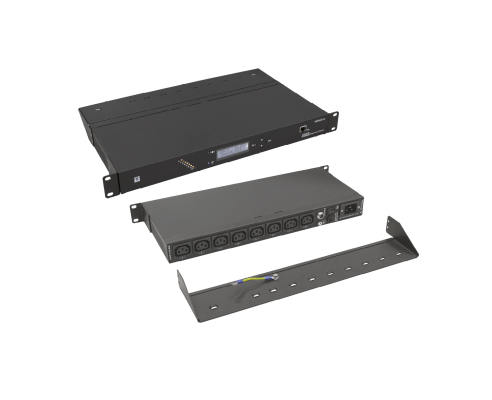
MPSM-S1 is a programmable 19" panel for power supply, control, monitoring and recording. It provides voltage, power and current measurement for each socket, and also temperature and humidity measurement. The device is equipped with an unparalleled set of features that make it indispensable in data communication infrastructure. Also, MPSM-S1 is equipped with a 8 GB internal memory used for storing the measurement results, events, alarms which lasts for about 24 months of continuous recording.

USABLE FEATURES

  • SOFT-START – soft start of servers, cabinets, automation components, etc.
    Allows for defining individual power-up delays for individual panel sockets after power supply recovery or after activation of the SLAVE sockets. This allows you to set a dedicated power- up scenario for the entire set of devices powered from the MPSM-S1 panel.
  • MASTER-SLAVE – energy conservation
    Automatic shut-off of SLAVE sockets (devices) when the MASTER device (socket) is powered down. The level of energy consumption for the MASTER socket is constantly monitored by the power supply panel and when it exceeds the user-defined threshold, the SLAVE sockets are re-powered up. Powering up and down has also user-defined time delay. Each socket in MPSM-S1 panel can work in MASTER, SLAVE or NONE mode (excluding MASTER-SLAVE functionality). With this solution, you can change the configuration of the set powered from the MPSM-S1 panel without having to physically plug the devices to dedicated sockets (continuity of operation).
  • PDU-THERMOSTAT – multi-stage control of fans, heaters and air conditioners
    Each panel socket can be activated by the temperature on the basis of being above or below the user-defined value. Individual socket can also be activated by a signal below or above different set temperatures.
  • PDU-HYGROSTAT – multi-stage control of humidifiers and air dryers
    Each panel socket can be activated by humidity levels on the basis of being above or below the user-defined value. Individual socket can also be activated by a signal below or above set values.
  • Output control
    Allows for powering down any panel socket regardless of its mode and time.
  • Indication of alarm states:
    - exceeded set value for current or underload of individual sockets
    - exceeded set value for current or underload of the entire set of connected receivers
    - grid voltage above or below the setpoints
    - ambient temperature above or below the setpoints
    - humidity above or below the setpoints
  • Device settings:
    - hysteresis (ΔT) for thermostat
    - hysteresis (ΔH) for hygrostat
    - time delay for the MASTER-SLAVE function
    - load display mode power (VA) or current (A)
    - reset to factory defaults
  • On-line monitoring of:
    - current and power for individual slots
    - current and overall joined power
    - mains voltage
    - temperature and humidity
  • On-line monitoring of:
    - recording of measurements, events, alarms
    - clock, calendar with battery backup
    - even 24 months of continuous recording
  • Ethernet Interface:
    - data read and write via network (LAN/WAN)
    - remote on-line management and monitoring
    - SNMP, SNTP, DHCP
    - Windows® management application
  • Display settings
    Choosable content of display.

Thanks to the special technique used for creating the device software, all functions are executed in parallel. It means that while we’re in menu editing settings, the device is working in the background, performing its status tasks and immediately responds to changes which have just be done or received measurements. After a power loss, the device will rememer the last saved configuration. The clock and the calendar work even during prolonged power failure.

TECHNICAL SPECIFICATIONS

SOFTWARE FEATURES

In the era of globalization, data communication devices and people who manage them are often miles apart, while the devices themselves are scattered over great areas, creating locally smaller and larger systems. To make remote managing of data communication infrastructure with MPSM-S1 devices as convenient as possible, we created Windows-dedicated software. Using a built-in address book, the software connects to a specific MPSM-S1 device to perform configuration, retrieve and save data. This way, you can manage and control large systems from a single location. The application consists of tabs containing all the functions of the MPSM-S1. The first tab – DASHBOARD – is the instrument panel which contains the key parameters measured by the device. The panels include also the ARCHIVE tab with filters that you can use to download and view historical data, such as measurements, events, alarms, configuration changes. You can generate as many windows with historical data as you want so you can compare the data in various configurations based on selected filters. Data can also be exported to a CSV file and then imported into Excel, for example. The application has a "back to the past" feature where you can select any point on the archives diagram to go back to that moment in time to see measurements, events, alarms and configuration. The data will be presented in the main application as if they were happening right at this moment. MPSM-S1 supports SNMP protocol in read mode. The software comes with an SNMP tree model as a MIB file which can be imported into your control systems. The device also supports TRAP, meaning it sends alarm and event notifications to predefined servers. Codes and descriptions of TRAPs are included with the software.

APPLICATION SCENARIO

Example of programming the panel functions:

SOFT-START
Scenario for starting the devices after power supply recovery:

TimeAction
0 sPower start
2 sD6
4 sD7
6 sD8
8 sD4
10 sD5
12 sD3
14 sD2
90 sD1

MASTER-SLAVE
Scenario for powering up Slave devices after powering up the Master
device:
D1 - Master
D2, D3, D4 - Slave
T = 5 s (delay time for powering down and up the Slave devices)
I = 0,5 A (current drawn from the Master slot; below this value, the Master device is regarded as powered-down)

THERMOSTAT/ HYGROSTAT
Scenario for powering up cooling,
humidifying and drying devices in the
case of exceeding programmed
temperature and humidity thresholds:
D4: RHmax = 80 %
D5: RHmin = 20 %
D6: tmax = 25 °C
D7: tmax = 27 °C
D8: tmax = 32 °C
RHmin = 15 %

INTERNAL ALARMS
Load alams
D1: Imin = 0,1 A
Temperature alams
Tmax = 35°C
Voltage alams
Umax = 250 V
Umin = 207 V
If the current, temperature or voltage
values are outside preset thresholds,
the internal panel alarm will be
signalled (sound signal and a flashing
message on the display).

SCENARIO DESCRIPTION

The MPSM-S1 device supports the cabinet holding set of devices operating within one logical solution, UPS, main ventilation panel, auxiliary ventilation panel, humidifier, air dryer and alarms. The logical solution should be understood as a set of interdependent devices, each of which is necessary for proper operation of the whole. In such a case, the appropriate set power-up scenario is extremely important. For example, when the server is turned on faster than the disk array, then it will not detect the disk array at the time of checking the readiness of individual devices and thus the entire system may fail to start. In this scenario, the server is switched on as the last the device with an additional time delay. Then you can be sure that all of its peripherals (disk array, tape library, etc.) are ready to work and will return ready-to-use during data bus scanning. Furthermore, when the main device of the system is turned off, the other devices do not have to be working any longer.

In this configuration, the MPSM-S1 ensures the following:

  • correct scenario for powering up the devices
  • a device dependent on the master server is disconnected after the DeltaMS time, when the server is remotely
    or physically switched off maintaining constant temperature by controlling the ventilation panel, and in the next step, when the temperature continues to rise, powering up the auxiliary ventilation panel
  • maintaining constant humidity in a room by switching the humidifier on when RH humidity drops below 20 %, and switching the air dryer on when RH humidity rises above 80 %
  • MPS M-S1 alarm and external alarm (alarm lamp) when the MPS M-S1 have exhausted all measures and is no longer able to maintain the correct ambient temperature or humidity
  • MPSM-S1 alarm when the server is disconnected or shuts down by itself due to a failure or other actions
  • supply voltage level control and MPSM-S1 alarm when the value of this voltage exceeds the allowable limits
  • on-line visualization of temperature, humidity, supply voltage or currents on each of the slots, and their overall values from all slots; all on the LC D display

Note:
The parameter values used in the scenario are merely illustrative and may vary from those in specific real systems.

MONITORING AND CONTROL SYSTEM BASED ON MPSM-S1 DEVICES